Bus Traffic Fever Level 5 Guide: The Color Key
Level 5 introduces the full color sequence. The queue shows the order: match each bus to the color at the front, clear it, and the next color slides forward.
The Color Key in Level 5
A level with three distinct colors feeding a queue in a set order. It is the first level where you must hold the whole sequence in mind rather than clearing whatever looks free.
Step-by-Step Walkthrough
First Moves: Lock the First Color
- Read the queue and fix the first color in mind.
- Find every bus in that color.
- Dispatch the one with the clearest path to a slot.
Midgame: Move Down the Sequence
- As each group boards, re-read what color is now at the front.
- Dispatch that color's bus before touching any other.
- Keep the slots from filling with buses whose color is not up yet.
Finishing: Finish the Sequence
- Work through the remaining colors in queue order.
- Check no out-of-order bus has taken a slot.
- Confirm the final group boards to clear the level.
Verified Video Walkthrough
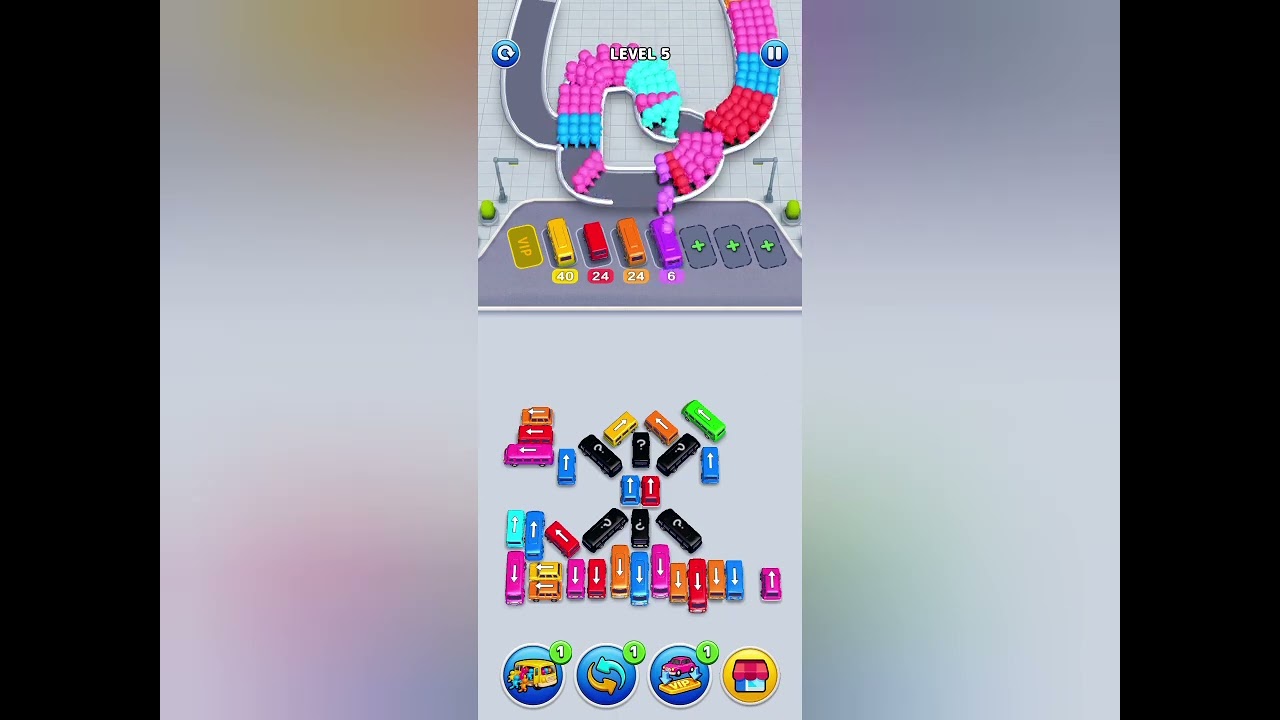
Match the queue front to back — never skip to a color that is not up yet.
Dispatching a bus out of queue order because it is free. It sits in a slot, blocks a needed color, and stalls the sequence.
Pros and Cons
Pros. Once the sequence is read, the level is just execution.
Cons. Three colors tempt you to clear out of order and jam the slots.
Get the Official Game
Bus Traffic Fever Level 5 FAQ
How do I beat Bus Traffic Fever Level 5?
Treat the queue as a color key and dispatch buses in that exact order. The front group always tells you the next color.
What if I'm color-blind in Bus Traffic Fever Level 5?
Match by shade and position rather than name. Each group and bus use the same distinct tone, and the order is what matters.
Does the color order change between attempts in Bus Traffic Fever Level 5?
No, the queue order is fixed each run, so the same color sequence solves it every time.
Are the Bus Traffic Fever Level 5 colors the same in every game version?
Levels can shift after a game update, so if your colors look different, re-read the queue on screen rather than trusting an old guide.
Why does my Bus Traffic Fever Level 5 layout look busier than the video?
Because a wrong dispatch leaves extra buses parked. Clear in queue order and the level empties down to the same clean finish.